




Raidefend Technologies provides IT security and infrastructure services to businesses of all sizes. We partner with leading tech providers to deliver tailored, reliable, and secure solutions that drive success.

Gallery

Contacts

Meydan Freezone - Al Meydan Rd - Nad Al Sheba , Dubai

support@raidefend.com

800 48 2273

Dubai · UAE · GCC

File Server Replacement in Dubai & UAE.

Replace legacy Windows and NAS storage with a cloud workspace planned around your files, access model and everyday business workflows.

RAIDEFEND helps organisations assess what they have today, map how teams need to work, and carry out a controlled move to a more flexible file environment.

Business leaders reviewing access planning together in a Dubai office
Start with the real workflowFiles, access rules and teams should guide the migration plan.

A practical migration story

See the replacement path in motion.

A concise look at the decisions that help teams move from legacy file storage to a more usable, controlled workspace.

Read the video transcript

When business files are tied to ageing Windows servers or local NAS devices, everyday access becomes harder than it should be. For organisations across the UAE, RAIDEFEND helps assess content and map permissions for a controlled move to Egnyte. Start with the files that matter most, clarify access structures, and validate the new experience with a focused pilot. Then roll out in practical waves, supporting controlled sharing, version history, file locking and large-file workflows. Build a file workspace your teams can truly rely on.

Why organisations replace file servers

When storage starts holding the business back.

A file server often becomes the centre of daily operations without a deliberate ownership model. Over time, remote access becomes cumbersome, permissions become unclear and external sharing becomes risky. Replacement is an opportunity to improve how people find, access and collaborate on business content.

01

Legacy access

Remote dependency, branch-office complexity, mapped drives and routine VPN access can slow teams down when they need files away from the office.

02

Unclear permissions

Inherited access and unmanaged folders make it difficult to confirm ownership, remove outdated access or provide the right access to a new project team.

03

Risky sharing

Large files and external collaboration can move into personal tools or ad-hoc transfers when a controlled sharing method is not part of the working process.
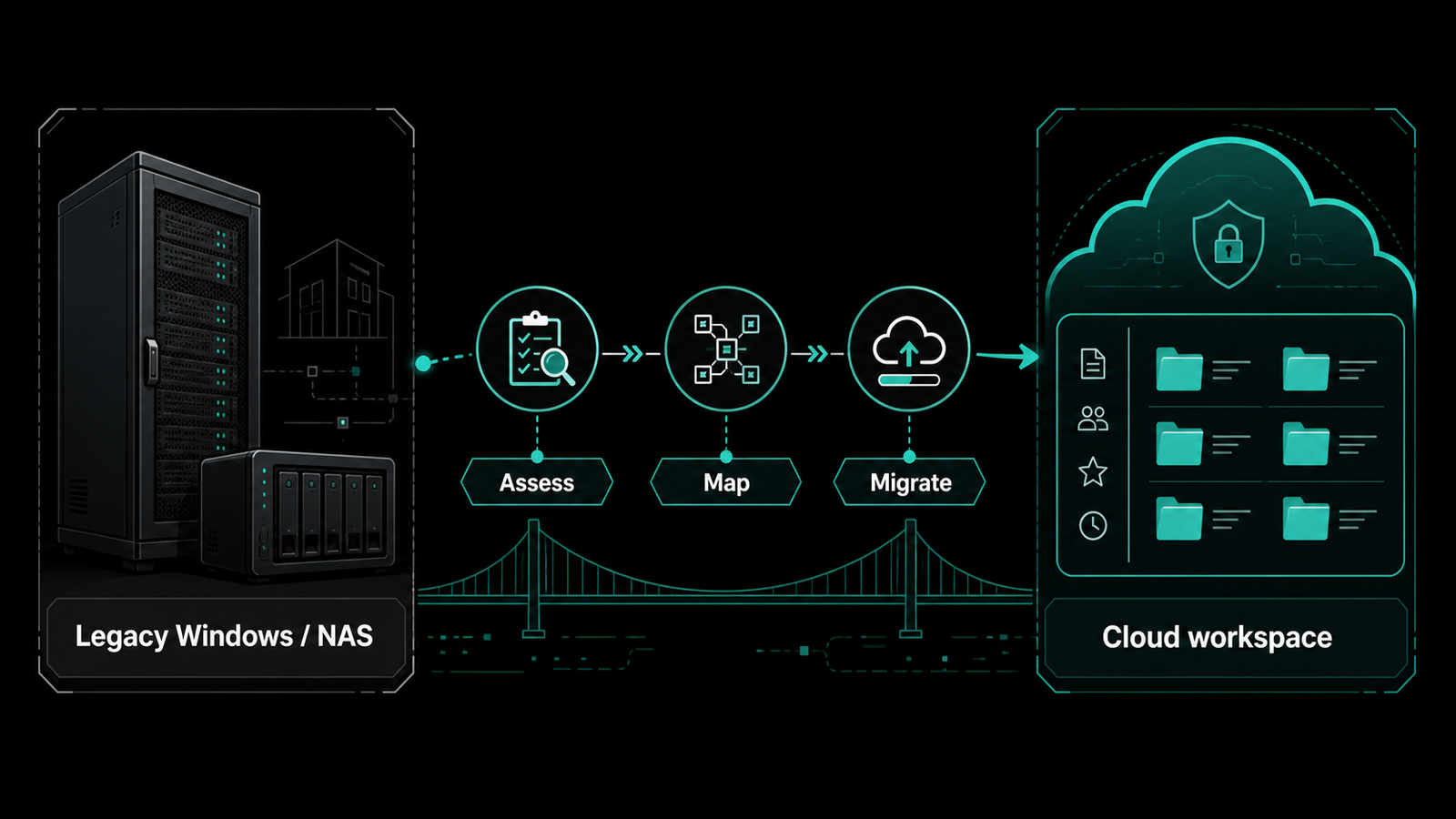
Legacy Windows and NAS storage moving through an assessment and migration path
The migration plan moves from assessment to a controlled cloud workspace.

Migration path

Plan the move in clear stages.

Each stage creates confidence for the next. The approach can account for active and archived data, folders, permissions, remote users, business applications and the different workflows that exist across departments.

  1. 01
    Discover the current estateReview data locations, ownership, folder structures, file volumes and business-critical workflows.
  2. 02
    Map the future workspaceTranslate permissions, project workspaces, external sharing needs and access responsibilities.
  3. 03
    Validate with a pilotTest desktop access, large-file workflows and daily collaboration with a focused user group.
  4. 04
    Roll out in controlled wavesMove teams with communications, adoption support and post-cutover checks included.

What the programme addresses

More than copying files from A to B.

A file server replacement should leave the organisation with a cleaner operating model. The result is not only a new location for data, but clearer content ownership, better access control and a practical method for collaboration.

01

Data assessment

Separate active business content from duplicate folders, outdated shares and material that needs an archive or retention decision.

02

Access mapping

Align groups, departments, roles and projects to a future-state permission model that is easier to understand and maintain.

03

Collaboration controls

Design repeatable sharing approaches for employees, customers, contractors and project partners instead of relying on ad-hoc transfers.

04

Change management

Build pilot feedback, onboarding, implementation support and cutover communication into the delivery plan from the start.

Built for day-to-day work

Better access. Better adoption.

The strongest workspace is one teams can use confidently. Clear access rules and practical collaboration workflows help the migration become a better business experience, rather than another technology change that creates new workarounds.

Business leaders collaborating on access planning in a modern office

Access by design

Make permissions understandable.

Review access with the teams who own the work so the future workspace is usable from day one. Access can be designed around departments, projects and temporary collaboration rather than years of inherited server permissions.

  • Access and permission mapping for teams and projects
  • Controlled sharing with customers, contractors and project partners
  • Version history and file-locking workflows for active documents
  • Governance conversations aligned to operating needs
Professional using a laptop during a workspace adoption session

Adoption in practice

Support the work after cutover.

Plan desktop use, project folders and the work patterns that must continue after migration. Adoption support helps teams transition without creating shadow copies, unmanaged shares or new collaboration gaps.

  • Large-file workflows for project and design teams
  • Practical onboarding and post-cutover guidance
  • Support checks for desktop access and daily collaboration
  • Migration waves aligned to business priorities

GCC coverage

Regional delivery, shaped around your teams.

RAIDEFEND supports file server replacement discussions across the UAE and wider GCC. Delivery planning is confirmed for each engagement based on the organisation's users, locations, stakeholders and operational priorities.

Saudi ArabiaMulti-site collaboration planning and structured project access.
QatarOperational continuity and access-role planning for business teams.
OmanShared working files for distributed teams and departments.
BahrainPermission design and collaboration workflow discussions.
KuwaitBusiness-led file-server modernisation planning.

Start with the current state

Build a file workspace your teams can rely on.

Discuss your current estate, migration priorities and the cloud workspace you want to create next.

Request an Egnyte demo or consultation
// faq

Egnyte - File Server Replacement : Frequently Asked Questions

What is file server replacement?

File server replacement is the planned migration from legacy Windows, NAS or on-premises file storage to a modern cloud workspace. It includes discovery, permissions mapping, pilot testing, migration and user adoption.

Why replace a legacy file server in Dubai or the UAE?

Legacy servers can make remote access, multi-site collaboration, external sharing and permissions management difficult. Replacement creates a more flexible workspace while supporting business continuity.


Can you replace a Windows file server with Egnyte?

Yes. Raidefend can assess the existing Windows file server, map folders and permissions, plan the target workspace and support a controlled migration to Egnyte.

Can NAS storage be migrated to Egnyte?

Yes. NAS data can be reviewed, classified and migrated according to business ownership, access requirements, file size, folder structure and retention needs.

How do you plan a file server migration?

The process normally includes current-state discovery, data assessment, permission mapping, target workspace design, pilot migration, user feedback and phased rollout.

How are file server permissions mapped during migration?

Existing groups, departments, project folders and access levels are reviewed. They are then translated into a clearer future-state permission model before migration.

Will users still be able to work with large files after migration?

Large-file workflows are included in the assessment and pilot. The migration plan considers design files, engineering documents, project data and other business-critical content.

How do you reduce disruption during file server replacement?

A phased approach helps reduce disruption. Teams can be migrated in controlled waves with pilot testing, communication, user onboarding and post-cutover checks.

What happens to file versions and locked documents?

The migration plan reviews version history, active documents and file-locking requirements so teams can continue working with better document control after cutover.

Who provides file server replacement support in Dubai and the UAE?

Raidefend provides assessment, migration planning, permissions mapping, pilot support, rollout guidance and user adoption assistance for organisations across Dubai, the UAE and the wider GCC.


    Ready to Get Started?

    Your email address will not be published. Required fields are marked *